Sales Teams: Share Proposals as Secure PDFs Without Email Attachments
As sales velocity increases, proposals often combine pricing models, legal terms, visual assets, and compliance documentation into a consolidated package. As document complexity grows, traditional email attachments become operationally inefficient.
While email remains the default channel, it introduces file size limits, version fragmentation, and no access visibility.
Sales teams generally adopt one of two workflows:
- Sending PDF attachments via email
- Sharing proposals through Google Drive using Drive Explorer Pro for structured control
This choice directly impacts document security, version integrity, and revenue operations visibility at scale.
To understand the operational trade-offs, it is important to examine both workflows in detail.
Table of Contents
Sending Proposals as Email Attachments
The traditional attachment-based workflow is simple:
- Create the proposal in your document or CRM platform.
- Export the final version as a PDF.
- Download the file locally.
- Attach it to an email.
- Send it to the client.
After delivery, the file becomes a static copy in the recipient’s inbox. Any revision requires exporting a new version, attaching it again, and sending another email creating multiple uncontrolled copies across threads.
While manageable at low volume, this approach introduces duplication, limited access control, and fragmented document tracking as proposal activity increases.
The differences become more apparent as proposal volume and revision frequency increase.
This is where structured document control provides measurable operational advantages.
Email attachments are suitable when:
-
Proposal volume is low
-
Documents are rarely revised
-
Structured tracking is unnecessary
As proposal volume grows and revisions become frequent, attachment-based delivery begins to introduce control and visibility challenges. At this stage, centralized document management becomes necessary.
Drive-Based Sharing Using Drive Explorer Pro
If you are new to Drive Explorer Pro, it is a Google Sheets add-on that enables structured Google Drive file management directly within a spreadsheet. It enables structured upload, metadata extraction, link logging, and centralized file reporting without leaving the spreadsheet interface.
Instead of sending proposal attachments via email, you can upload the file to Google Drive and share a controlled access link.
This approach shifts proposal delivery from file distribution to permission-based access management.
Step 1: Installing Drive Explorer Pro
-
Open Google Sheets.
-
Click Extensions → Add-ons → Get add-ons.
-
Search for Drive Explorer Pro.
-
Click Install and grant the required permissions.
-
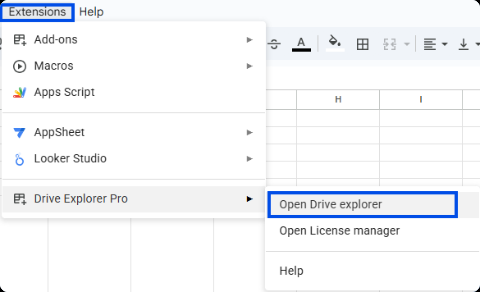
After installation, access it via Extensions → Drive Explorer Pro → Launch.
Step 2: Uploading and Organising the Proposal in Google Drive
-
Finalize and export the proposal as a PDF.
-
Open your tracking spreadsheet in Google Sheets.
-
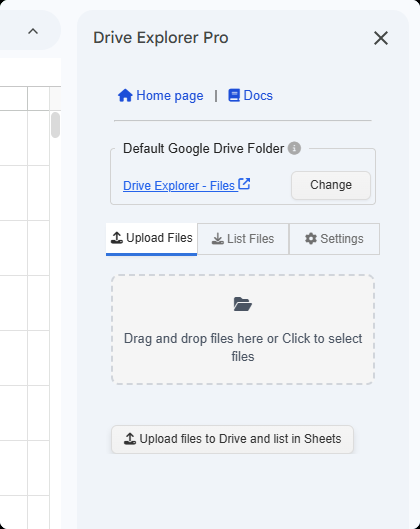
Launch Drive Explorer Pro from the Extensions menu.
-
In the sidebar, browse and select the appropriate destination folder in Google Drive (organized by client, deal stage, or region).
-
Upload the proposal directly into the selected folder.
Refer to the Drive Explorer Pro documentation for detailed configuration guidance.
This ensures the proposal is stored in a centralized, structured Drive location rather than on a local device or email thread.
Once stored centrally, the next priority is structured tracking.
Step 3: Tracking the Proposal Inside Google Sheets
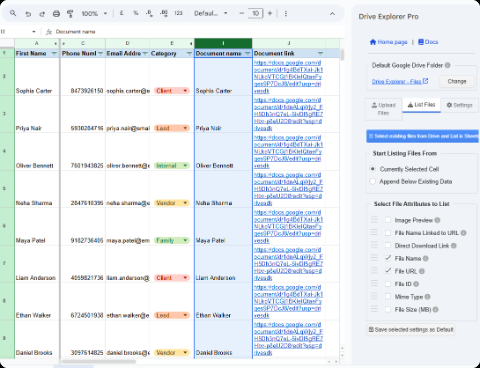
Using Drive Explorer Pro, you can:
- Insert the Drive file link into the spreadsheet
- Extract metadata such as file name, owner, created date, and folder path
- Associate the proposal with client name, deal stage, or sales representative
This creates a structured tracking system instead of relying on inbox searches or manual status updates.
Step 4: Sharing a Secure Drive Link
- Open the uploaded file in Google Drive.
- Click Share (or Get link).
- Set the appropriate permission level (Viewer, Commenter, or restricted access).
- Send the Drive link to the client instead of attaching the PDF.
If revisions are required, update the file in Drive while maintaining the same shared link. This prevents duplicate versions and eliminates confusion across email threads.
With secure link sharing established, the next consideration is when this workflow becomes strategically necessary.
Structured document control is recommended when:
-
Proposal volume is high
-
Revisions are frequent
-
Access must be modified or revoked
-
Sales activity spans multiple stakeholders
-
Compliance or audit visibility is required
With both workflows outlined, the operational trade-offs become clearer when evaluated at scale.
The distinction is not technical complexity, but governance and control maturity.
From Attachment-Based Proposals to Structured Drive-Controlled Sharing
As proposal volume increases, email attachments introduce structural limitations that compound over time:
- File size restrictions
- Duplicate versions across email threads
- No access tracking or revocable control
- Fragmented document storage
- Limited visibility into document organization
Instead of sending static files, a structured document control workflow shifts proposal management toward controlled access.
Over time, this reduces fragmentation across email threads and internal systems.
Proposals are stored centrally in Google Drive, permissions can be modified or revoked at any time, and file activity can be tracked inside Google Sheets. This eliminates duplicate versions and preserves a single authoritative document across stakeholders.
Instead of distributing static files, teams manage controlled access to centrally stored documents.
Over time, this approach improves version control, enhances security posture, and creates operational consistency for revenue teams handling high proposal volume.
In regulated or high-value sales environments, centralized storage also reduces compliance risk by maintaining a single auditable document source rather than distributing uncontrolled file copies across inboxes.
Beyond secure sharing, structured document control enables broader sales operations visibility.
Once proposals are centrally managed, they can also be measured, reported, and optimized.
Sales Operations Capabilities with Drive Explorer Pro
Drive Explorer Pro enables centralized proposal management within Google Drive, replacing scattered attachments with structured document control.
Key Advantages
- Centralized storage within a defined folder hierarchy
- Permission-based access with revocable control
- Single-link version integrity (no duplicate files)
- Structured tracking in Google Sheets (client, stage, owner, status, date)
- Standardized upload and organization workflows
Extended Capabilities
- Generating proposal inventory reports
- Tracking proposal volume by rep or period
- Organizing folders by deal stage
- Maintaining a searchable proposal archive
- Building dashboards for pipeline visibility
Instead of using Drive as passive storage, this workflow transforms it into an operational control layer for proposal management.
This structural shift compounds in value as teams scale.
Conclusion
Email attachments remain functional for low-volume proposal workflows, but structural limitations emerge as document complexity and revision cycles increase.
A structured document control workflow using Drive Explorer Pro centralizes storage, enforces permission-based access, and preserves version integrity within Google Drive and Google Sheets. Instead of distributing static files, teams manage controlled access to a single authoritative document.
As proposal activity scales, this approach strengthens governance, improves visibility, and ensures operational consistency across the sales pipeline.